

CMOs as Builders: Skills, Efficiency and Model Switching
Why working harder with AI costs you more than working smarter:

In Post 4, you learned how to stop losing your work. Sessions. Context files. The three Markdown files that give Claude a standing briefing so you never start from scratch. Your projects now persist across sessions. Your context carries forward. You have a system.
Now I need to tell you about the day that system cost me $75. Not because the system failed. Because I was running it on the wrong settings.
This post is about the settings.
This is Part 5 of the CMOs as Builders series, where I use my experiment in AI code to teach B2B technology CMOs to build with AI instead of just chatting with it. If you are just finding this, start with Post 1 -- Why CMOs Who Build Will Win.
Subscribe to get every post in this series delivered free.
The full series:
1 -- Why CMOs Who Build Will Win
2 -- Your First 30 Minutes with Claude Code
3 -- How to Give Claude Code Its Orders
4 -- Stop Losing Your Work: Sessions and Context
5 -- Skills, Efficiency and Model Switching ← you are here
6 -- Beyond the Terminal: MCP, n8n, JSON and the Tools That Connect Everything
7 -- From Terminal to Teammate 8 -- The CLAUDE.md Blueprint
Skills, Efficiency and Model Switching
What you’re about to learn -- why working harder with AI costs you more than working smarter:
You have been running every task on the same model at the same settings. You probably did not even know there were settings. That is like running every marketing campaign on the same budget and timeline regardless of whether it is a product launch or a social post. The tool is not the problem. The defaults are.
By the end of this post you’ll:
Know which model to use for which task -- and switch between them in seconds inside Claude Code or Cursor
Understand effort levels, fast mode, and extended thinking -- three controls that affect speed, cost, and quality independently
Have a set of commands that let you monitor and manage context, tokens, and cost in real time -- no surprises, no runaway bills
Have a practical framework for preventing the $75 mistake I made -- so your first billing surprise is also your last
Why this matters for you as a CMO:
Model switching is not a technical skill. It is a resource allocation skill. The CMO who runs Opus on a bulk tagging job is burning budget the same way a CMO who puts senior strategists on data entry is burning headcount. This post gives you the judgment to match the right resource to the right task -- and the controls to enforce it.
Time to read: 14 minutes
What you need: Claude Code installed and running (Post 2), familiarity with sessions and context (Post 4)
The $75 Wake-Up Call
I need to tell you about the most expensive lesson I have learned with Claude Code.
Early on, I was building a messaging framework for a client -- what I call the Solutions Messaging OS. It is a system that takes competitive research, customer interviews, and product positioning and produces a structured messaging architecture. The kind of work that used to take a strategist two weeks.
I was running Claude Code and I had extended thinking turned on. Extended thinking is a mode where Claude shows its reasoning process before giving you an answer. It is powerful for complex strategy work. It is also expensive.
“I hit 22 million tokens in one session and spent $75 before I noticed. Then I built a Slack alert so it would never happen again. That is the whole point of this series in one sentence.”
I did not notice that my session had routed through the API instead of my Max subscription. I did not notice that extended thinking was burning through tokens at a rate I had never seen. I did not check /cost once during the session.
By the end of the day, I had hit 22 million tokens. The bill was over $75. For one session.
That number might not sound catastrophic. But it was not what I budgeted, it was not what I expected, and it happened because I did not understand three things: which model I was using, how that model was billing, and what controls were available to me.
This post exists so you never have that moment.
Meet the Models
Claude is not one model. It is a family of models, each built for different work at different price points. Think of it like a team, not a tool.
Haiku is your fast executor. It is the cheapest model in the family and the fastest. Use it for anything that runs in volume -- reformatting 50 blog posts for social, tagging hundreds of CRM records, cleaning up CSV files, simple data transforms. Haiku does not think deeply. It does not need to. It processes.
Sonnet is your reliable senior manager. This is the default model in Claude Code right now (Sonnet 4.6 as of this writing), and for good reason. It handles 80% of what a CMO needs. Campaign briefs. Content drafts. Data analysis. Code generation. It balances quality, speed, and cost better than any other option. I’m redesigning our style guide for Mighty & True right now in Sonnet. It works amazingly well. When in doubt, stay on Sonnet.
Opus is your strategist. This is the most capable model Anthropic makes. Use it when quality matters more than speed or cost. Competitive messaging frameworks. Complex multi-step analysis. Anything where a wrong answer costs you more than a slow answer. Opus 4.6, the current version, launched in February 2026 and introduced a 1 million token context window in beta -- enough to process an entire corporate document library in a single session.
Here is what this looks like in practice:
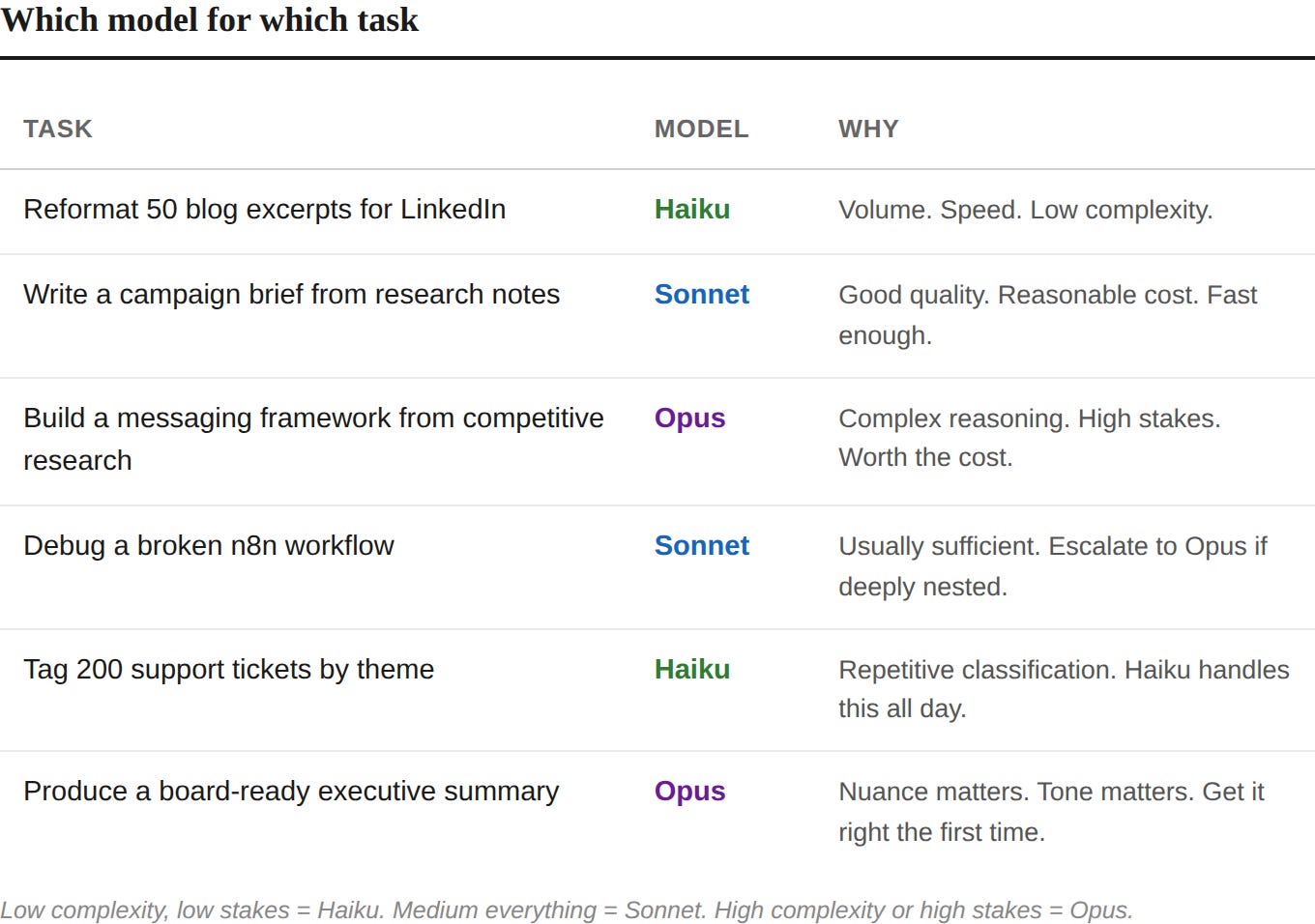
You do not need to memorize this. You need to internalize one question: How complex is this task, and how much does getting it wrong cost me?
“Model switching is not a technical skill. It is a resource allocation skill. The CMO who runs Opus on a bulk tagging job is burning budget the same way a CMO who puts senior strategists on data entry is burning headcount.”
Low complexity, low stakes = Haiku. Medium everything = Sonnet. High complexity or high stakes = Opus.
How to Switch Models
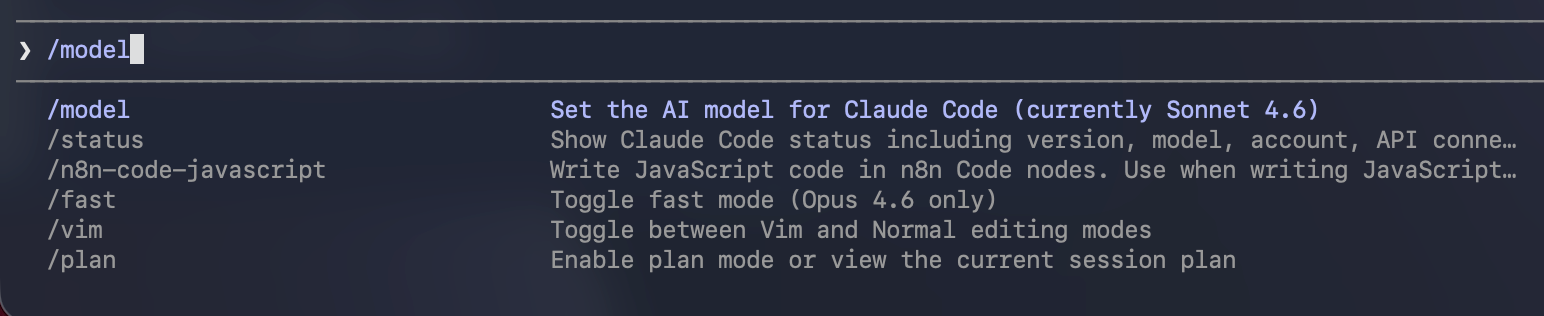
In Claude Code, type /model and press Enter. You will see a list of available models. Arrow keys to select. That is it. You are now running on a different model. The switch takes effect immediately in your current session. Here’s Anthropic’s handy guide on this.
In Cursor, model switching works differently. Cursor gives you access to models from multiple providers -- Claude, GPT, Gemini, and Cursor’s own models. You switch in the model dropdown at the top of the AI panel or in Settings.
This brings us to an important tradeoff.
The Cursor Question
If you followed Post 2 and set up Cursor as your IDE, here is what you need to know about how models work inside it.
Cursor has two AI systems running side by side. The first is Cursor’s own AI -- the tab completions, inline suggestions, and Composer features built into the editor. These use Cursor’s model pool. You pay for them through your Cursor subscription. You cannot route them through your Claude Max subscription.
The second is the Claude Code terminal. You can open Claude Code inside Cursor’s integrated terminal, and when you do, it runs on your Claude Max subscription. Full Claude Code. Full model switching. Full access to everything we have covered in Posts 2 through 4.
Here is the tradeoff:
What Cursor gives you that Claude Code alone does not:
Access to models from multiple providers. GPT. Gemini. Cursor’s own models. If Claude is down or rate-limited, you have alternatives.
Tab completions and inline suggestions. Cursor predicts your next edit as you type. This is genuinely useful for anyone writing code or structured files.
A visual IDE with a file browser, diff view, and familiar interface. If looking at a terminal makes you uncomfortable, Cursor softens the experience.
What you give up or pay extra for:
You are running two subscriptions. Cursor Pro ($20/month) plus Claude Max ($100 or $200/month). That cost adds up.
Cursor’s AI features and Claude Code’s terminal do not talk to each other. They are separate systems sharing a screen.
Claude Code running in Cursor’s terminal does not get Cursor’s inline diff view or visual feedback. You are still in the terminal.
My recommendation for CMOs: If you are using Cursor, run Claude Code from the integrated terminal for any serious building work. Use Cursor’s native AI for quick edits, tab completions, and small tasks where the visual feedback helps. Think of Cursor as your desk and Claude Code as the person sitting at it doing the real work.
If you are comfortable in the terminal and do not need the visual IDE, you can skip Cursor’s subscription entirely and run Claude Code directly. You will save $20/month and lose nothing in capability.
Effort Levels, Fast Mode, and Extended Thinking
Here is another important distinction that tripped me up early. Model selection is one control. But Claude Code has three more controls that affect your output speed, quality, and cost -- and they work independently of each other.
Effort Levels
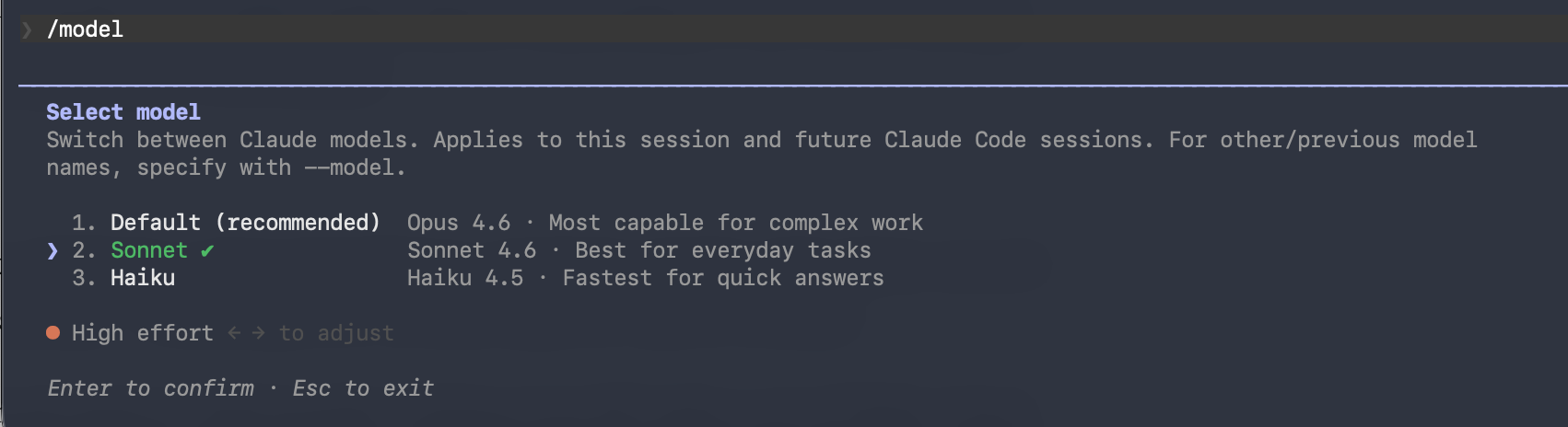
When you run /model and select a model, look at the bottom of the screen. There is a slider you adjust with the left and right arrow keys. This is the effort level.
Effort controls how deeply the model thinks before responding. It has three settings: low, medium, and high. High is the default.
Low tells Claude to think less and respond faster. Good for simple tasks where you do not need deep reasoning -- renaming files, formatting text, quick lookups.
Medium is a balanced option. Solid quality without the full token cost of high. Good for routine coding work, standard content tasks, anything where you want decent output without waiting.
High is the default for a reason. This is where Claude does its best work. Complex analysis, strategy documents, anything where the quality of thinking matters.
Think of it like this. Low effort is a quick Slack reply. Medium effort is a thoughtful email. High effort is a board presentation. Same person, different investment of attention.
The practical move: drop to medium for routine work. Keep high for anything you would not want to redo.
Fast Mode
Fast mode is different from effort levels, and this is the part people confuse.
Effort controls how deeply Claude thinks. Fast mode controls how quickly Claude delivers the output. They are independent knobs.
Type /fast in Claude Code and press Tab. A lightning bolt icon appears next to your prompt. You are now getting the same model, the same intelligence, the same quality -- but the output arrives up to 2.5x faster. Anthropic prioritizes your request on their infrastructure.
The catch: fast mode costs more. At full price, it runs 6x the standard token rate. It also bills directly to extra usage, not against your subscription allowance.
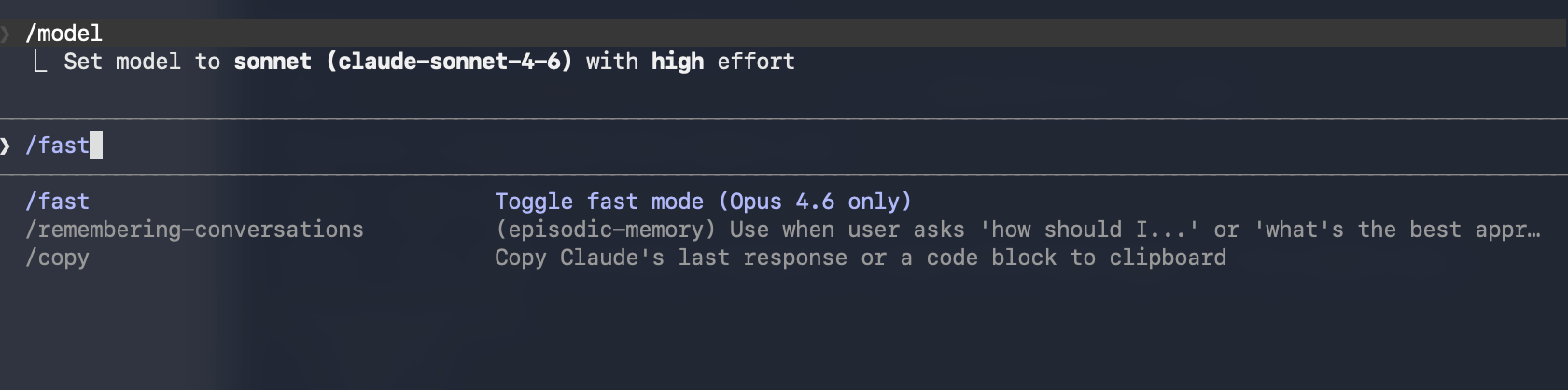
When to use it: interactive sessions where you are iterating rapidly and every 30-second wait breaks your flow. Live debugging. Quick back-and-forth on a draft.
When to skip it: any task where you hit Enter and walk away. If you are not watching the screen, you will not notice the speed difference, and you will notice the bill.
Fast mode persists across sessions once enabled. Type /fast again to toggle it off. The lightning bolt disappears.
Extended Thinking
Extended thinking is the mode that cost me $75.
When extended thinking is on, Claude does not just give you an answer. It shows you its reasoning process -- the steps it takes to work through a problem before producing output. This is valuable for complex strategy work. When Claude is building a competitive messaging framework or analyzing a multi-layered dataset, seeing the reasoning lets you spot where it might be going wrong before it finishes.
Extended thinking is also expensive. Every token of reasoning counts toward your usage. A session that would use 50,000 tokens normally might use 500,000 with extended thinking on, because Claude is now producing its full chain of thought.
The current default: thinking is enabled automatically on Opus with adaptive thinking, meaning Claude decides when and how much to think based on the complexity of what you ask. On Sonnet, it works similarly. This is usually fine. The problem comes when you force high effort plus extended thinking on a task that does not need it.
My rule: I let adaptive thinking handle it for most sessions. I only explicitly push thinking depth (high or max effort on Opus) when I am doing genuine strategy work -- messaging frameworks, competitive analysis, anything where the reasoning process matters as much as the output. And when I do, I check /cost regularly.
The Decision Framework
Here is how these controls stack together:
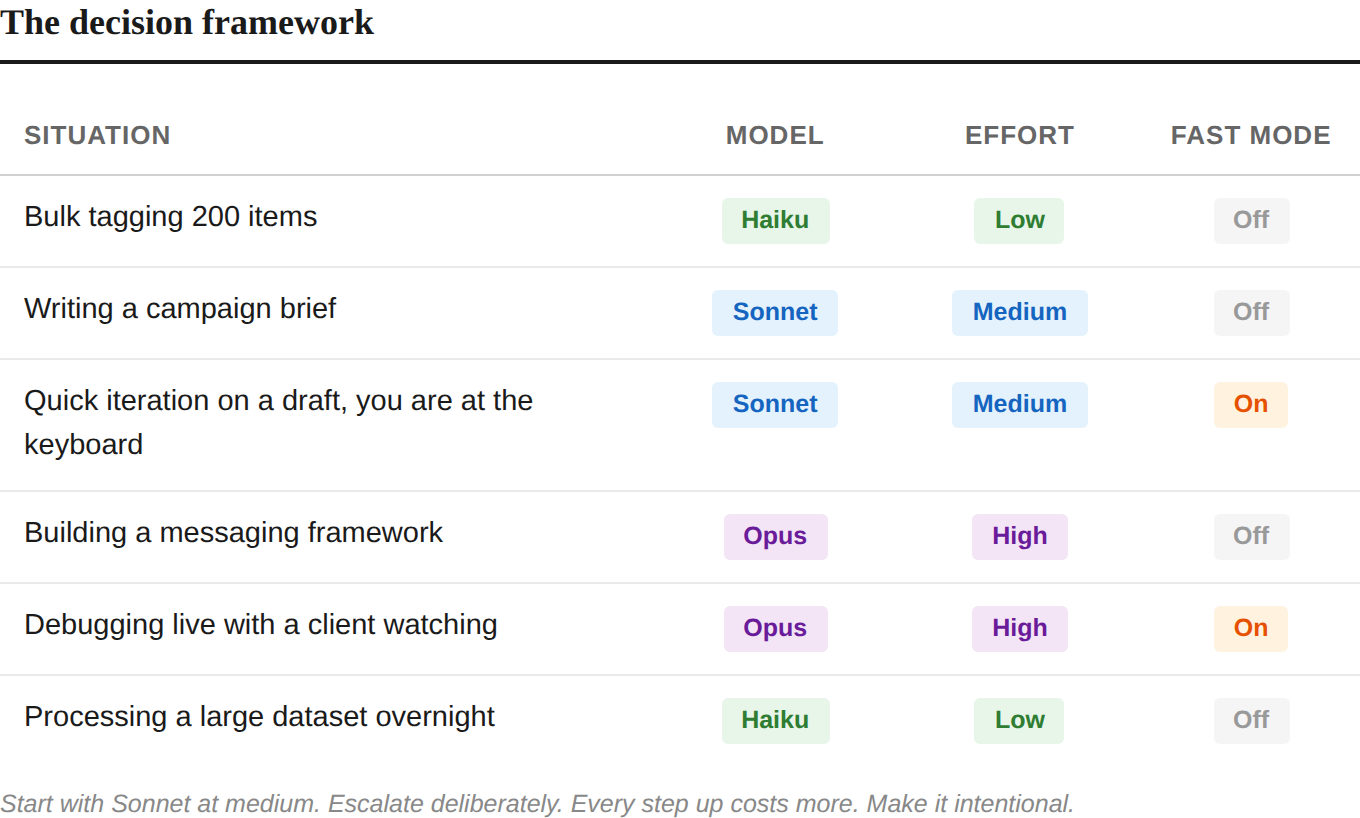
The pattern: start with Sonnet at medium. Escalate deliberately. Every step up in model, effort, or speed costs more. Make those steps intentional.
The Commands That Keep You in Control
You have more visibility into what Claude Code is doing than you think. Here are the commands that matter.
/context -- Your Cockpit Dashboard
Type /context and Claude Code shows you exactly how your context window is being used. System prompt. Memory files. Skills. Messages. Free space. Autocompact buffer.
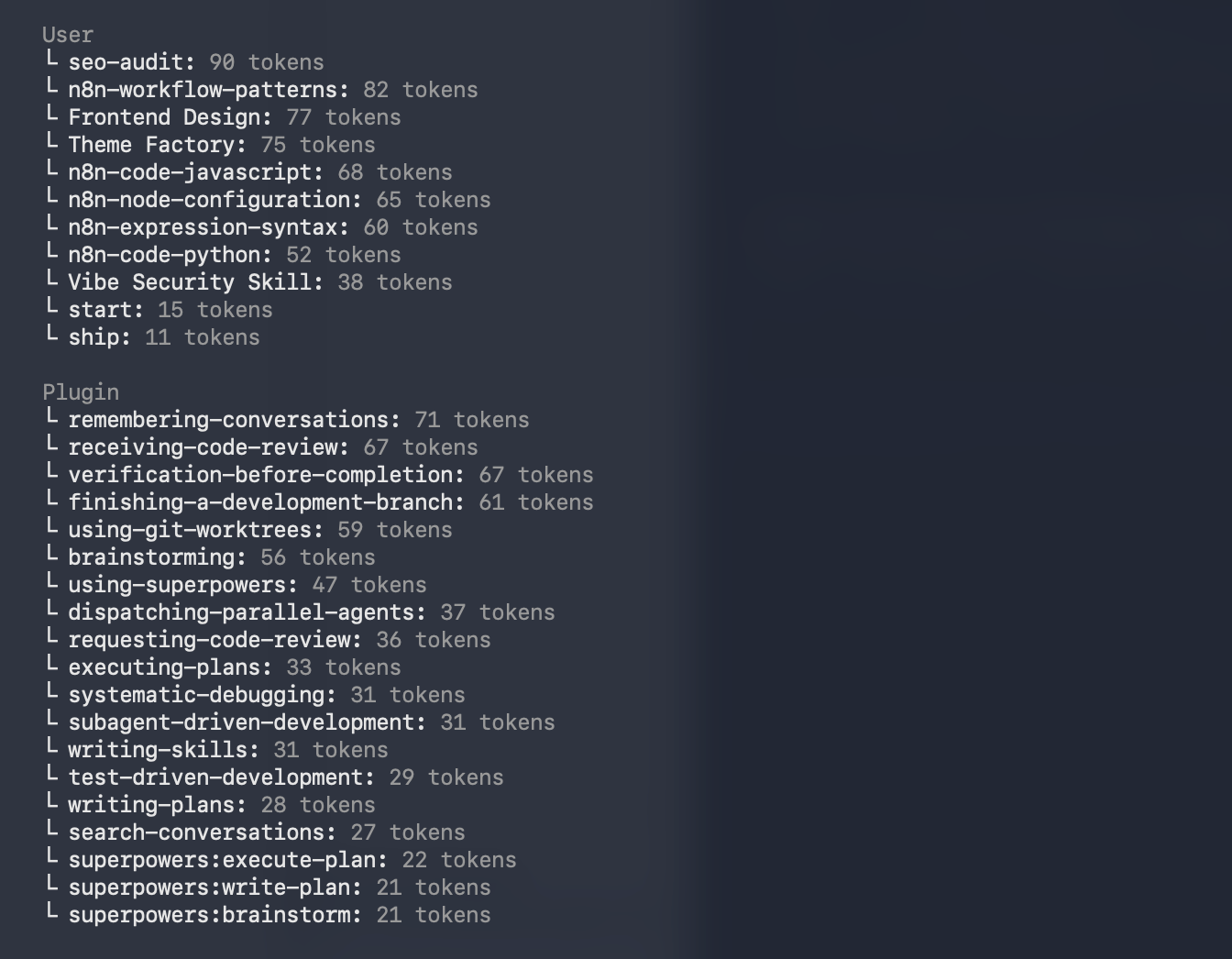
This is the command I wish I had known about from day one. When your free space gets low, Claude’s performance starts to degrade -- it has less room to reason. Check /context periodically during long sessions the way you check your phone battery.
/compact -- Controlled Compression
When your context is getting full, /compact tells Claude to summarize the conversation and free up space. But here is the key: you can give it specific instructions about what to keep.
/compact -- keep the campaign brief details and the file structure decisions. Drop everything about the debugging we did earlier.
This is dramatically better than letting auto-compact happen on its own. Auto-compact triggers when your context hits roughly 83% capacity. It happens mid-task. It summarizes everything generically. You lose precision on the details that matter.
Manual compacting at natural breakpoints -- after you finish a task, before you start a new one -- keeps you in control. Think of it like saving your game before a boss fight.
/clear -- The Fresh Start
/clear wipes the entire conversation. No summary. No holdover. Blank slate.
Use this when you are switching to a completely different task. If you just finished a campaign brief and now you need to debug a workflow, do not carry that campaign context forward. It wastes tokens and confuses the model. Clear and start fresh.
/cost and /stats -- Know What You Are Spending
/cost shows your token usage for the current session. If you are on API billing, this is your actual cost. If you are on a Max subscription, it shows what the session would cost at API rates -- useful for understanding your consumption patterns.
/stats shows your broader usage patterns for subscribers.
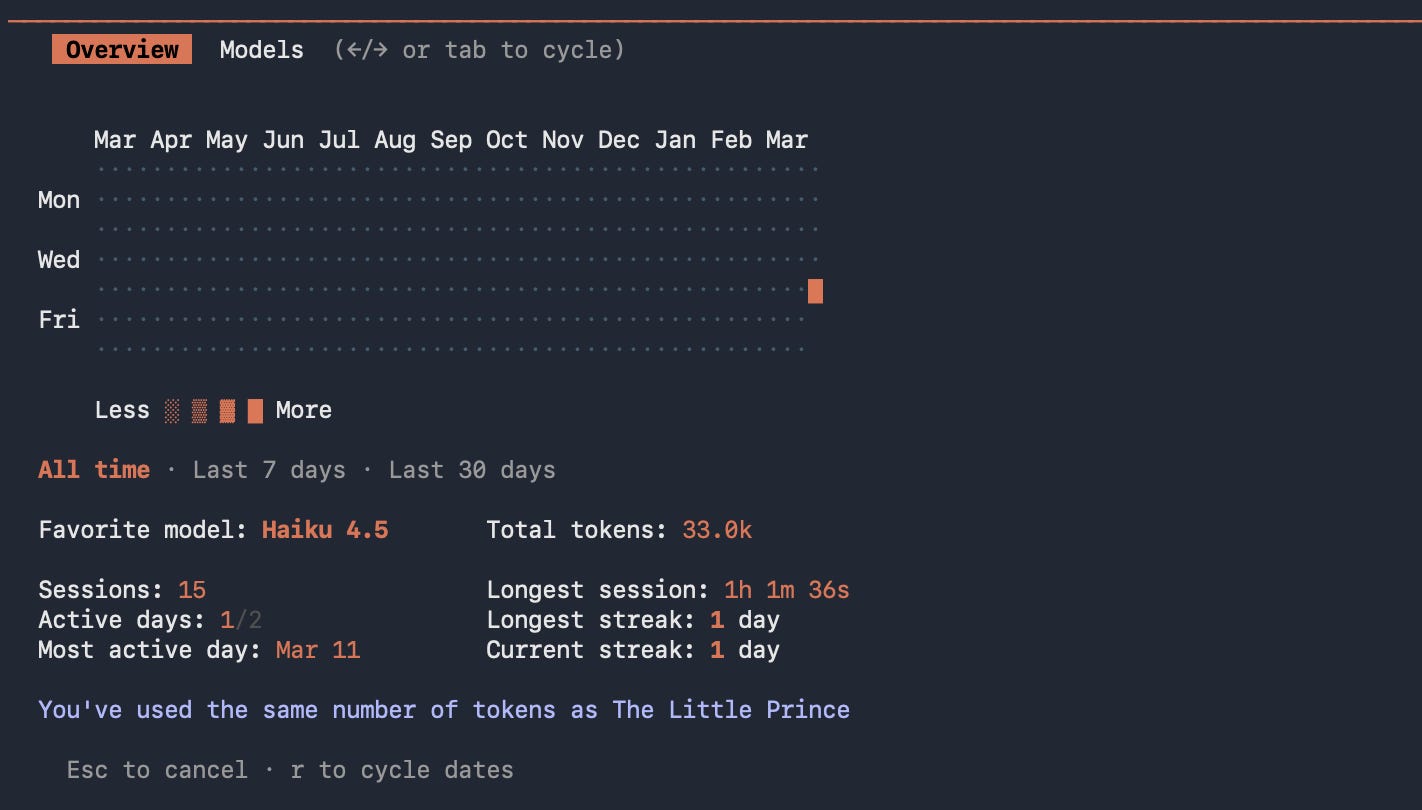
Get in the habit of checking /cost the way you check the clock during a meeting. Not obsessively. Just enough to know where you stand.
Auto-compact: What Happens When You Do Not Manage Context
If you never run /compact or /clear, Claude Code handles it for you. When your context window fills to roughly 83% capacity, auto-compact triggers automatically. Claude summarizes the conversation, frees up space, and continues.
The problem: it happens at the worst possible time. Mid-task. Mid-thought. The summary is generic because Claude does not know which details matter most to you. You lose the specific error message you were debugging. The exact phrasing you agreed on for a headline. The architectural decision you made forty minutes ago.
Auto-compact is a safety net, not a strategy. Manual compacting is the strategy.
Cost Control: Building Your Safety Net
Now that you understand models, effort levels, and context management, here is the practical infrastructure that keeps you from repeating my $75 mistake.
Subscription vs. API Billing
This is the single most important thing to understand about Claude Code billing.
Max subscription ($100 or $200/month): You pay a flat monthly fee. Claude Code usage is included. You get a generous but not unlimited token allowance per 5-hour session window. When you hit the limit, you wait. You do not get a surprise bill.
API billing (pay per token): You pay for every token, every session, no ceiling. This is how developers use Claude programmatically. It is also how you accidentally spend $75 in an afternoon if you do not know you are on it.
When you first set up Claude Code in Post 2, I told you to select “Use your Max subscription” at the login prompt. If you did that, you are on subscription billing. If you selected the API option, or if you are running Claude Code through an API key in your environment, you are on pay-per-token billing.
Check now. Type /cost in your next session. If it says something like “With your Claude Max subscription, no need to monitor cost,” you are on subscription billing. If it shows actual dollar amounts accumulating, you are on API billing.
Setting Spend Limits
If you are using API billing for any reason -- running automations, connecting external tools, or experimenting with programmatic access -- set spend limits in the Anthropic Console at console.anthropic.com.
Go to Settings. Go to Billing. Set a monthly spend limit that matches your budget. Set up email alerts at 50% and 80% of that limit.
This takes two minutes and it is the single highest-value safety measure you can put in place.
The Dashboard I Built to Watch Everything
After the $75 incident, I did what this series teaches you to do. I built something.
Using Claude Code, I created a monitoring dashboard and a Slack alert system that tracks spend by API key in real time. When any key crosses a threshold I set, I get a notification in Slack. I can see which projects are consuming what, which models are being used, and whether anything is running away.
I built this in one afternoon. It uses Python, the Anthropic API’s usage endpoints, and a Slack webhook. Three files. One afternoon. It has been running for months and has caught two potential overruns before they became problems.
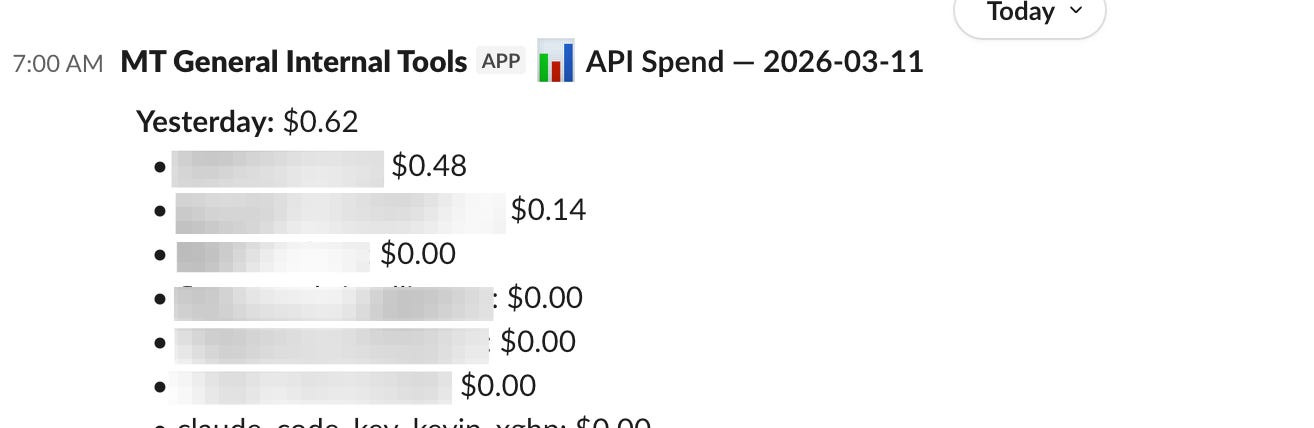
This is the builder mindset in action. The skills you learned in Posts 2 through 4 -- writing directives, managing sessions, working with files -- let you build tools that manage the tool itself. That is the compounding effect.
For subscriber-only monitoring, the community has built tools like ccusage -- a command-line utility that parses your local Claude Code session data and shows you daily, monthly, and per-session token usage. It is useful if you want to understand your consumption patterns beyond what /cost shows.
Your Spend Prevention Checklist
Print this. Tape it next to your monitor. Follow it until it becomes habit.
Before every session:
1. Confirm your billing mode. Subscription or API. Know which one.
2. Set your model deliberately. Default to Sonnet. Escalate to Opus only when the task demands it.
3. Check your effort level. Drop to medium for routine tasks.
During every session:
4. Check /context every 30 to 45 minutes. Know how much room you have.
5. Check /cost if you are on API billing. No surprises.
6. Run /compact at natural breakpoints. Do not wait for auto-compact.
Before using Opus or extended thinking:
7. Ask yourself: does this task actually need deep reasoning, or am I defaulting to the expensive option out of habit?
8. If it does need Opus, check /cost more frequently. Extended thinking burns tokens fast.
For any automated or programmatic usage:
9. Set spend limits in the Anthropic Console.
10. Set email alerts at 50% and 80% of your limit.
11. Build or install a monitoring system. The dashboard took me one afternoon.
What Just Happened
You now know something most Claude Code users take tens if not hundreds of sessions to learn: the tool has layers of control that dramatically affect what you spend and what you get.
Model switching is about judgment. The same judgment you use when you decide whether a project needs a senior strategist or a junior coordinator. The same judgment you use when you set a campaign budget.
Effort levels, fast mode, extended thinking, context management -- these are levers. You now know where they are and what they do. The CMO who learns to pull them deliberately will get better output at lower cost than the CMO who runs everything on default.
In Post 6, I am going to take you beyond the terminal entirely. We are going to talk about MCP, CLIs and APIs -- the connectors that let Claude talk directly to your other tools. And n8n -- the visual orchestration layer that lets you wire multiple systems together with Claude making decisions at each step. That is where individual efficiency becomes system-level automation.
But the cost controls you learned today apply to everything that comes next. Post 6 involves workflows that run automatically. Workflows that run automatically can run up bills automatically. The habits you build now are the habits that protect you later.
Kevin Kerner is the founder and CEO of Mighty & True, a B2B tech marketing agency that helps CMOs and their teams improve their growth programs while also building AI-powered marketing systems.
If you are a CMO or marketing leader not getting enough done while also trying to figure out where AI fits in your operation -- not just the tools, but the workflows, the automation, the systems that actually move the needle -- reach out. Speed to outcome, efficiency, and performance. That is what we build for.