


If you’ve been following this series, you’ve spent five posts learning to work inside Claude Code. You’ve given it orders. You’ve managed sessions. You’ve controlled costs. That’s all foundational.
Now we open it up.
Claude Code was never meant to stay contained in a terminal window. It’s built to connect -- to your files, your tools, your data, your workflows.
This post is where that happens.
CMOs as Builders is an 8-part series for technology marketing leaders who are ready to move from using AI to building with it. Each post builds on the last.
If this is useful, subscribe so you don’t miss what’s next.
The Series:
Beyond the Terminal: MCP, APIs, and the Tools That Connect Everything (you are here)
From Terminal to Teammate (coming next)
The CLAUDE.md Blueprint (coming soon)
What you’re about to understand. How Claude Code connects to the rest of your world:
You’ve been working in a terminal, building things locally. That’s real progress. But if Claude Code only works with what you type into it, you’re still doing a lot manually. The shift happens when Claude Code starts working with your actual files, calling your actual tools, and operating inside your actual workflows -- without you babysitting every step.
By the end of this post you’ll know:
How to connect Claude Code to local files and folders -- and why this is the most immediately useful thing you can do
The difference between CLI, API, and MCP connections -- and when each one is the right tool
How to store API keys securely -- so you’re not leaving the door open to unexpected charges or worse
When to add an orchestration layer like n8n -- and when you don’t need one
What a fully connected Claude Code system actually looks like in practice
Why this matters for you as a CMO:
Right now, you probably switch between a dozen tools to get anything done. Claude Code connected to your stack collapses that. You stop moving data between systems manually. You stop rebuilding context every time you switch tabs. You start building workflows that run -- with you making the decisions, not doing the labor.
Time to read: 12 minutes
What you need: Posts 1--5, Claude Code installed, at least one API key from a tool you already use
Start Where You Already Are: Local Files and Folders
The most underrated capability in Claude Code has nothing to do with APIs or integrations. It’s simpler than that.
Claude Code can work with files sitting on your machine right now.
No API keys. No configuration. No middleware. You point it at a folder, and it reads, writes, edits, and organizes whatever is in there -- using the full power of the model you’ve been building with all series long.
What this looks like in practice:
Drop a folder of customer research documents into a directory. Tell Claude Code to synthesize them into an executive summary. It reads every file, pulls the signal, writes the output -- and saves it back to the same folder.
Drop a folder of competitor PDFs. Ask for a comparison matrix. Done.
Drop a month of sales call transcripts. Ask for a structured breakdown of objections by product line. Done.
I did exactly this with a Voice of Customer project - raw survey responses and support tickets in a folder, structured executive report out. No template. No manual tagging. No analyst hours. Claude Code read the inputs and built the output directly.
This also extends beyond documents. Claude Code can run scripts, execute processes, and trigger things that actually happen on your machine. You’re not just generating text. You’re running operations locally.
The mental shift: your working files are already the input. You don’t need to move anything anywhere. You just need to know how to point Claude Code at what already exists.

The CLI: The Terminal Is Where Serious Tools Live Now
CLI stands for command line interface. It’s the terminal you’ve been working in all series. One line of text, something happens.
You already know this. What you might not know is that the terminal is becoming the standard interface for serious tools, not just for developers anymore.
Case in point: Google just released their own CLI. You can now interact with Google’s AI tools, manage Google Cloud resources, and run operations across Google’s ecosystem -- all from the terminal. No browser required. No clicking through dashboards.
Claude Code operates here natively. It doesn’t just use the terminal, it lives in it. That means you can chain operations, trigger scripts, run processes, and call other CLI tools all from the same place you’ve been working.
What this means practically: you’re not just typing prompts. You’re operating your machine. Claude Code in the terminal can kick off a Python script, call a shell command, read the output, make a decision based on what it finds, and write the result to a file -- all in one session.
That’s not a chatbot. That’s a system operator.
The practical takeaway: get comfortable with the terminal as a place where things run, not just a place where you type. The more tools publish CLIs -- and they will -- the more valuable that comfort becomes.
API Connections: Claude Talking Directly to Other Software
An API is a door that software leaves open so other software can talk to it.
Every major tool you use has one. Slack. HubSpot. YouTube. Buzzsprout. Notion. Google. They all publish APIs because they want other software to be able to connect to them (and increasingly, they create MCP connections… see more in that section below).
Claude Code can walk through those doors directly. No workflow tool required. You write the call, you get the response, you do something with the output -- all from the terminal.
JSON: the language tools use to talk to each other
When Claude Code calls an API, it communicates in JSON. JSON stands for JavaScript Object Notation. Ignore the name. What it actually is: a standardized form that every system knows how to read.
Think of it like a shipping manifest. Every package, no matter where it’s going or where it came from, uses the same format. Sender, recipient, contents, weight. JSON is that format for data moving between software systems.
You don’t need to write JSON by hand. Claude Code handles it. But you should know it exists, because you’ll see it when things connect and when things break.
API keys: what they are and why security matters
To use an API, you need a key. An API key is a unique credential that tells the service: this request is authorized, and bill it to this account.
That last part matters. An exposed API key isn’t just a security problem. It’s an open billing account. Someone finds your Anthropic API key, they run a million tokens through it -- you pay for it. Same with OpenAI, Google, any service you’ve connected.
Never paste API keys into chat windows. Never commit them to a shared document. Never store them in plain text files inside a project folder.
How I handle it:
For general credentials, I use LastPass. You likely already have it or something like it. Use it for API keys the same way you use it for passwords.
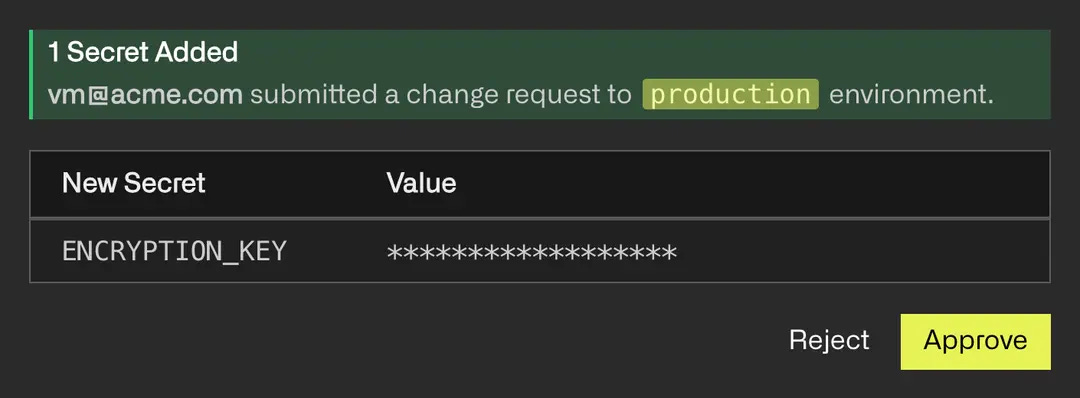
For projects where multiple API keys need to be managed across a workflow or shared carefully with a team, I use Infisical. It’s purpose-built for secrets management. Think of it as LastPass specifically designed for developers and builders. You store keys in Infisical, your workflow pulls them securely at runtime, and they never sit exposed in a file.
The rule: treat every API key like a credit card number. Store it somewhere secure. Rotate it if you think it’s been exposed. And if you’re ever setting up a workflow that uses API keys -- build the secure storage step in from the start, not as an afterthought.
What you can connect:
From your terminal, with the right API keys stored securely, Claude Code can call:
The Anthropic API directly -- useful for building tools that use Claude as the engine
YouTube API -- upload, retrieve, manage video data
Buzzsprout -- post audio, retrieve episode data
HubSpot or Salesforce -- pull contact data, update records, trigger sequences
Google APIs -- Drive, Calendar, Sheets, all of it
Any tool that publishes an API -- which is most tools you already use
This is where the AI Tiers framework I’ve written about becomes concrete. Most CMOs spend their budget at Tier 1 and Tier 2, baked-in AI and platform add-ons. Real leverage lives at Tier 3 and Tier 4, orchestration and custom connections… and at a fraction of the cost of the point solutions trying to do the same thing.
API connections are your entry point into that territory.
MCP: The Native Connection Layer
MCP stands for Model Context Protocol. You don’t need to remember the acronym. What you need to understand is what it does.
MCP is a connector that lets Claude talk directly to your other tools -- not through a workflow, not through copy-paste, but natively. As if Claude is sitting inside those tools.
With the right MCP connections configured, Claude can:
Read a page in your Notion workspace
Update a task in Asana
Pull contact data from your CRM
Read files in your Google Drive
Post a message to Slack
No switching tabs. No copy-paste. No manual handoff. Claude goes and gets what it needs, does the work, and puts the output where it belongs.
How MCP is different from an API connection
An API connection is something you build -- you write the call, you handle the response, you manage the integration. It’s powerful but it requires setup.
MCP is purpose-built for AI-to-tool connection. The protocol is standardized, which means tool providers are building MCP support directly into their products. You configure it once, and Claude has native access.
Think of the difference this way: an API connection is like building a bridge yourself. MCP is like a bridge that already exists -- you just need to know where the entrance is.
The context load warning -- this is important
Here’s something most people learn the hard way when they get excited about MCP.
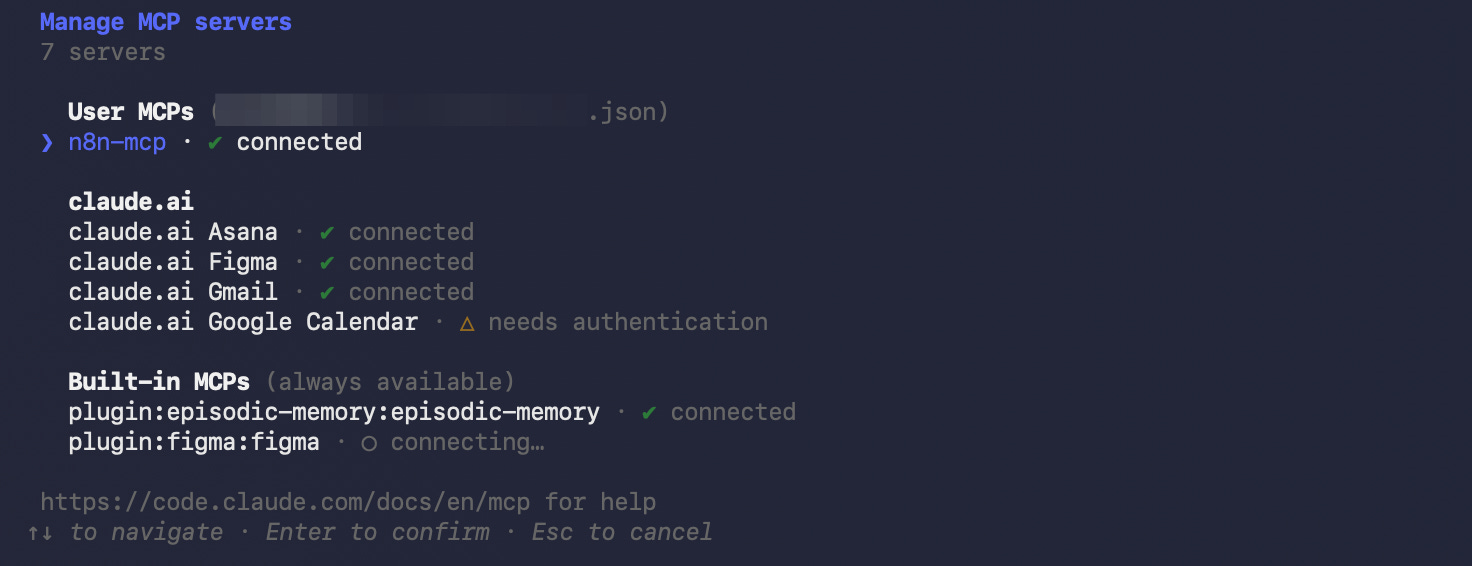
Every MCP connection you load into Claude Code adds to the context window on every single conversation. Whether you’re using that connection or not.
Load ten MCP connections and you’re burning context, and money, before you’ve typed a word. The model is holding all of those connections in memory, waiting to use them, even when the task at hand has nothing to do with any of them.
The practical rule: only load the MCP connections you actually need for the work you’re doing right now. If you’re building a content workflow, load the content tools. If you’re doing research, load the research tools. Don’t connect everything because you can.
More connections does not equal more power. It equals more cost and slower, less focused sessions.
Be deliberate. Load what you need. Unload what you don’t.
MCP tools worth knowing about:
Notion
Asana
Google Drive
Slack
HubSpot
GitHub (more on this in Post 7)
The list is growing fast. Most major platforms are adding MCP support. When a tool you already use announces MCP support, it’s worth paying attention.
When You Add an Orchestration Layer
Everything in the previous three sections, local files, CLI, API, MCP, Claude Code can handle directly. You don’t need anything else for a lot of use cases.
But there’s a category of workflow where you want something more: visual structure, automatic scheduling, multi-system triggers, and human approval steps built in.
That’s where orchestration tools come in. n8n is what I use and recommend. Zapier and Make are alternatives, more familiar to most marketers, less flexible and more expensive at scale.
What n8n adds:
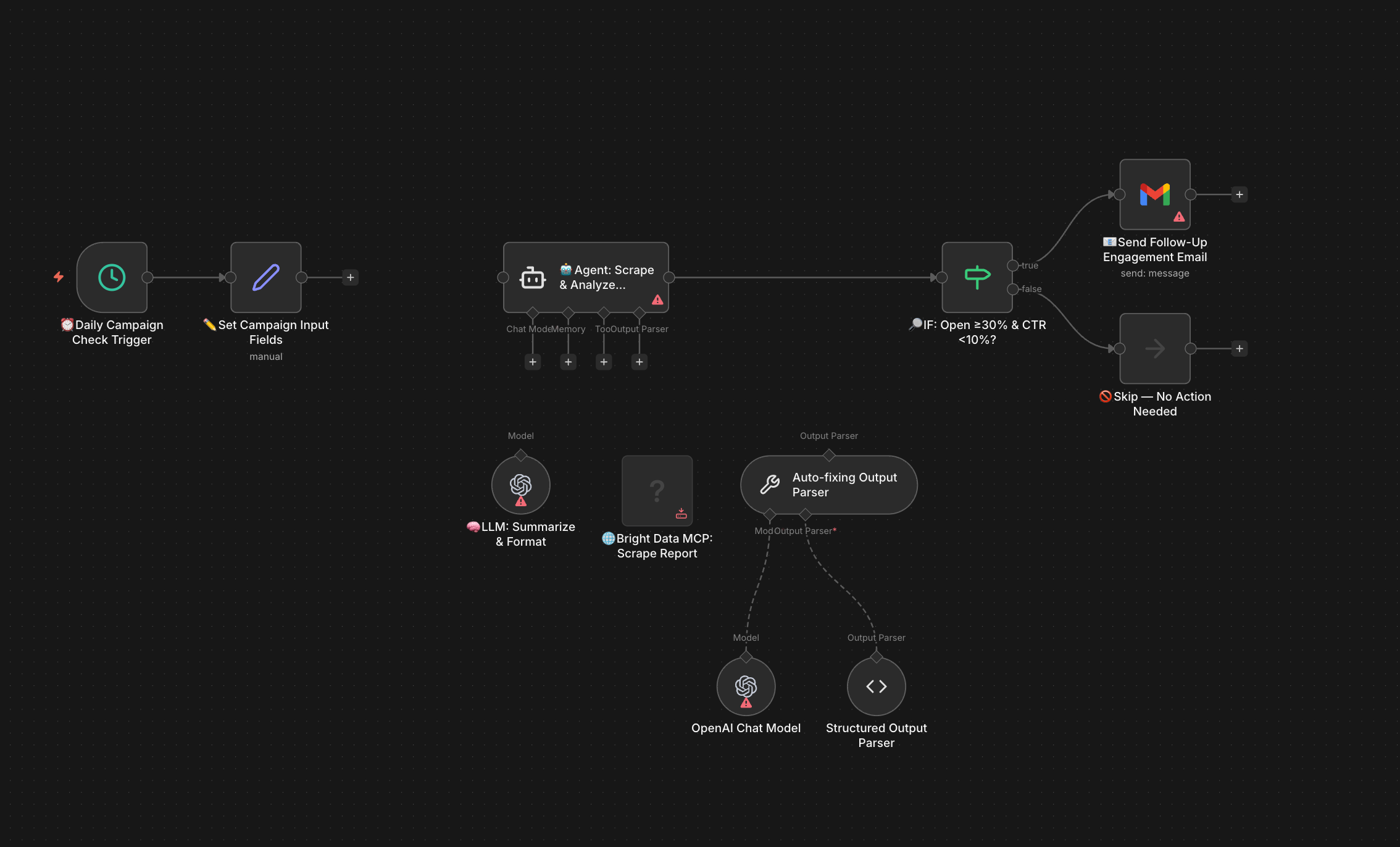
You see your workflow as a diagram. Each box is a step. Each arrow is data moving between steps. Claude sits at the decision points where intelligence is needed. Everything else is routing.
You can schedule it. You can trigger it from an event. You can build an approval step where a Slack message goes to you, you reply, and the workflow continues based on your response.
That last part -- the human-in-the-loop design -- is how I build everything. Automation doesn’t mean removing yourself from decisions. It means removing yourself from the parts that don’t require decisions.
When n8n is worth it:
When your workflow has multiple systems, runs on a schedule or trigger, and needs to keep running without you manually starting it every time.
LaunchPod is the clearest personal example I have. A completed podcast episode dropped into a Google Drive folder triggers the entire workflow: YouTube upload, Buzzsprout audio post, Webflow episode page built, eight content pieces generated by Claude, content queue populated, posts scheduled to LinkedIn, X, and Substack via Late.dev. Start to finish in about three minutes. I cancelled a part-time marketing hire because of it.
That complexity justifies the orchestration layer. You need the visual diagram. You need the scheduling. You need the error handling. n8n gives you all of it.
The LinkedIn Content Machine runs on three separate workflows. Workflow one pulls meeting transcripts from Google Drive and Google Calendar, extracts one content idea per day via Claude, and sends it to me via Slack with a suggested angle. Workflow two: I reply with my take, Claude writes the full post using my angle and my voice guidelines. Workflow three: I approve or edit in Slack, the post goes to Late.dev for scheduling. Human in the loop at every decision point. Fully automated everywhere else.
When you don’t need n8n:
Single-task automation. One-time builds. Anything Claude Code handles end-to-end in a terminal session. If you can describe the task in one sentence and it doesn’t need to run on a schedule, you probably don’t need an orchestration layer.
Start without it. Add it when the complexity earns it.
One more thing: n8n skills
If you want to go further with n8n, building workflows, connecting systems, setting up the orchestration layer for your own automations, Mighty & True has skills available for this. We’ve built the workflows. We know where the friction points are. Reach out if you want a faster path to getting it running.
What a Connected System Actually Looks Like
Let me walk you through the LinkedIn Content Machine end to end -- because it shows every layer working together.
The inputs:
Google Calendar: what meetings happened this week
Google Drive: transcripts from those meetings
The trigger: n8n workflow runs each morning, pulls the previous day’s activity
The intelligence: Claude reads the transcripts, identifies the strongest idea worth sharing, writes a suggested angle -- not a post, just a direction
The human step: I get a Slack DM. One idea. One angle. I reply with my take.
Back to Claude: it takes my reply, writes the full post in my voice, using my voice guidelines stored in the workflow
Another human step: I see the draft in Slack. I approve it or edit it and approve it.
The output: post goes to Late.dev, scheduled and queued
What this replaced: 45 minutes of thinking, drafting, and scheduling -- every day. Manually. Often skipped.
What it costs to run: a few cents in API calls per post.
No developer built this. I built it by understanding the layers -- local files, API connections, Claude as the brain, n8n as the visual structure, Slack as the human interface.
That’s the system. You can build one too.
A Note on Keeping It All Organized
As your connections multiply, your files multiply. Scripts, configurations, API call templates, workflow files, CLAUDE.md instructions, it adds up fast.
You need a way to keep all of it organized, versioned, and recoverable.
That’s what GitHub is for.
We’ll cover it properly in Post 7. For now, know it exists and know you’ll want it. GitHub is not a developer tool in the way you might be picturing it. It’s version control -- a system that tracks every change you make, lets you roll back to any previous version, and keeps your work safe even when something breaks.
As your system grows, GitHub becomes the backbone. We’ll build that in next.
How this Changes your Workflow
You started this series opening a terminal for the first time.
Now you’re looking at a system where Claude reads your Google Drive, writes a file locally, calls an API, routes the output through Slack for your approval, and publishes when you say go.
That’s not a chatbot you upgraded. That’s infrastructure you built.
Post 7: From Terminal to Teammate -- bringing other people and other systems into what you’ve built. GitHub, team workflows, and the next layer of scale.
If you’re building marketing systems and want a faster path -- or if you want help designing the architecture before you start building -- that’s what we do at Mighty & True. We work with marketing teams who are serious about moving from tool-buyers to builders.